
Fiber connection and distribution references
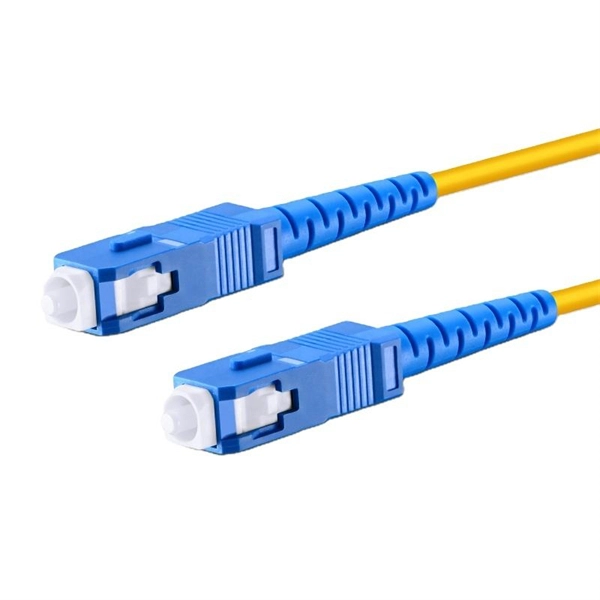
How to Connect Fiber Optic Cable to Ethernet?
In summary, you cannot directly connect fiber optic cable to Ethernet; you need a media converter or a device with SFP/SFP+ ports and appropriate transceivers to handle the conversion
SFP+ to RJ45 connection in Data Center
With the help of a 10G-SFP-T Copper transceiver SFP+ to RJ45 connection in a Data Center can be easily realized and transforms a modern 10G SFP+ switch port to an RJ45-compatible
How to convert sfp to ethernet?
Converting SFP to Ethernet is a practical solution for integrating fiber optic and Ethernet networks, providing the benefits of both technologies. By carefully selecting the right equipment and following a
Understanding Fiber Media Converter Installation:How to set up it step
These devices are essential when you need to bridge fiber optic cables with Ethernet cables, especially in long-distance or high-speed network setups. In this blog post, we''ll guide you
How To Use A Fiber Optic Media Converter In Your Network
We will go over some of the best practices for installing a media converter and connecting it to hardware like a network switch, an optical transceiver, and fiber or copper cable.
How to interconnect the Gigabit RJ45 port with the SFP optical port
Insert the Gigabit electrical port module into the SFP optical port, and then connect the Category 6 network cable to the Gigabit RJ45 port. This method realizes SFP optical port to RJ45
How do i connect sfp to ethernet port?
Locate the SFP port on your network device. Align the SFP module with the port and gently insert it until it clicks into place. Ensure that the module is fully seated to establish a proper connection. If you are
RJ45 Interface Optical Module Guide
To learn about practical adapter solutions that enable flexible network designs integrating both copper and fiber, review our SFP+ to RJ45
Fiber to Ethernet Converter Guide
The adapter we''re discussing allows an ethernet device to communicate with and be transferred over fiber optic cable. You can also reverse the process and translate optical signals into
How to Install an SFP Module: Step-by-Step Guide
Learn how to install an SFP module correctly with step-by-step instructions, safety tips, hot-swap rules, and troubleshooting for reliable network links.
What is Differences Between Switch Optical Ports and Ethernet Ports
Ethernet speeds up to 1000M can be supported by Cat5 or Cat6 cables, while 10G networks require cables of at least Cat6A grade or higher. Key differences between switch optical
How to Use a USB Ethernet Adapter
A USB Ethernet adapter gives your laptop or desktop a stable wired connection without needing a built-in Ethernet port. Many newer Windows
SFP Optical Transceiver | SFP Optical Module | Perle
They can be intermixed in combinations of 1000BASE-SX, 1000BASE-LX/LH, 1000BASE-EX, 1000BASE-ZX, or 1000BASE-BX10-D/U on a port-by-port basis. Perle SFP Optical Transceivers are
Optical to Ethernet adapter : r/HomeNetworking
The box coverts single mode fiber to RJ45 Ethernet. But I would only go with that if your router? Doesn''t have an SFP port. If it does have one, look for a compatible SFP Ethernet (RJ45) module.
How To Use A Fiber Optic Media Converter In Your Network
In most cases, fiber optic media converters convert between copper and fiber optic cables. This allows you to connect devices that use different types of cabling, such as a computer
Understanding Fiber Media Converter Installation:How to set up it step
Make sure the following ports are available on the converter: Fiber-optic ports (TX/RX) for sending and receiving signals. Ethernet (RJ45) port for the copper Ethernet connection. Power
How To Connect Starlink Ethernet Adapter
Learn how to easily connect and set up the Starlink Ethernet Adapter to experience lightning-fast internet speeds and seamless connectivity.
Gigabit Fiber to RJ45 Ethernet Media Converter Dongle,
Gigabit Fiber to RJ45 Ethernet Media Converter Dongle, Optical Singlemode 10km/Multimode 800m, PoE Powered, Compact Design, Metal Housing, Micro
Related Video Reference
This video was associated with the source search result. Verify technical details against current product documentation and project requirements.