KENHARDT OPTICALNetworks across Africa Talk through a project
Fiber systems / Technical reading Optical reference library

Data Center Fiber Optic Cable Upgrade Plan

Inside this technical reference
Source context

AI source overview

A successful data center fiber optic upgrade requires careful planning, modular design, pre-terminated solutions, and adherence to standards to support current and future high-speed networks. 1.

Assess Existing Infrastructure

Begin with a detailed audit of your current fiber network. Document cable types, connector types, link distances, and performance metrics such as insertion loss and return loss using OTDR and power meters. Verify compliance with standards like TIA/EIA-568, IEC 60793/60794, and local regulations to ensure compatibility with new 400G components.

2.

Plan for Scalability and Future Growth

Map your data center topology, including rack layouts, cable routes, and patch panel locations. Forecast future bandwidth needs, considering AI, IoT, and cloud workloads. Use a leaf-spine architecture for predictable low-latency connections and easy expansion.

Allocate spare fiber strands, empty patch panel positions, and additional tray space to accommodate future upgrades. 3. Select Fiber Type and Cabling ComponentsSingle-mode fiber (OS2 G.

657. A2) for long-distance or backbone links; supports 100G–400G and beyond. Multimode fiber (OM4/OM5) for short-reach intra-data center connections; supports 10G–100G.

Pre-terminated MPO/MTP trunks and cassettes reduce installation errors, speed deployment, and simplify future upgrades. Use duplex LC connectors with BiDi transceivers to leverage existing MMF infrastructure and minimize changes to cabling. 4.

Design Modular and Redundant Pathways

Implement modular fiber systems with MPO/MTP trunks, breakout modules, and high-density patch panels. Plan overhead or underfloor pathways with proper ladder racks, trays, and bend radius management. Ensure redundant fiber paths between racks and switches to maintain uptime during maintenance or failures.

5.

Installation Best Practices

Respect minimum bend radius and pulling tension limits to prevent signal loss. Use cable management accessories like horizontal/vertical trays and Velcro ties to maintain organization. Clean all connectors and endpoints before installation; inspect with IEC 61300-3-35-compliant scopes.

Pre-test pre-terminated assemblies for insertion loss and return loss before deployment. 6. Testing, Certification, and DocumentationPerform OTDR testing, insertion loss, return loss, and continuity checks for all links.

Maintain detailed documentation of cable routes, patch panel assignments, and test results for troubleshooting and future upgrades. Schedule periodic audits and inspections to ensure long-term performance and compliance with evolving standards. 7.

Future-

Proofing Considerations

Design for higher bandwidths (100G–400G and beyond) to avoid frequent re-cabling. Use modular, scalable components to simplify moves, adds, and changes (MACs) as equipment evolves. Consider software-defined networking (SDN) integration for flexible management and monitoring.

Train staff on fiber handling, testing, and maintenance to ensure operational excellence. 8.

Summary

A comprehensive fiber optic upgrade plan combines infrastructure assessment, modular design, pre-terminated solutions, redundancy, rigorous testing, and documentation. By following these best practices, your data center can achieve high-speed connectivity, low latency, and scalability while minimizing downtime and operational costs, ensuring readiness for current and future network demands.

Research context

Reference summary

How to Plan Fiber Cabling for a Scalable Data CenterLearn how to plan scalable data center fiber cabling, from topology and capacity planning to modular de.

From reference to enquiry

Questions for your project

Use these editorial prompts alongside the linked excerpts. They identify items to confirm for your project.

Detailed reading / connection to installation

Fiber connection and distribution references
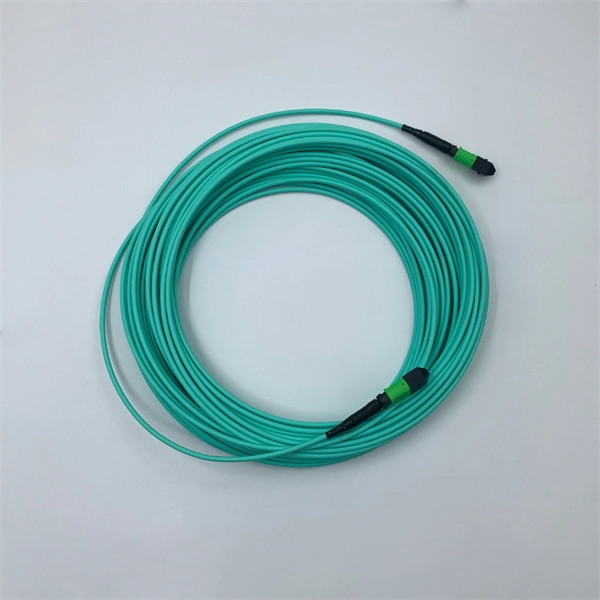
Data Center Fiber Optic Cable Upgrade Plan
Equipment illustration / verify against the selected product

How to Plan Fiber Cabling for a Scalable Data Center

Learn how to plan scalable data center fiber cabling, from topology and capacity planning to modular design, pathway layout, and future-proofing strategies.

Top Tips for Installing and Maintaining Fiber Optic Cables in Data

In this article, we''ll explore the best practices for installing and maintaining fiber optic cables in data centers, ensuring optimal performance, reliability, and scalability for years to come.

400G Era is Here: A Step-by-Step Breakdown of Upgrading Data

In this article, I share a comprehensive, step-by-step guide for upgrading your data center fiber cable infrastructure to meet 400G requirements.

Comprehensive Guide to Data Center Fiber Optic

The diagram above illustrates the critical components of fiber optic cables used in data center applications, highlighting the precise engineering required for optimal

Best Practices for Fiber Optic Cabling in Data Centers

In this article, we''ll explore the best practices for fiber optic cabling in data centers, covering everything from planning to maintenance (2). 1. Plan

Fiber Optic Installation Process 2026 Guide | ZION Communication

A practical, engineer-friendly guide to planning, installing, testing, and maintaining modern fiber optic networks for FTTH, FTTR, smart buildings, and data centers in 2026.

Six Considerations When Planning Data Center Network Upgrades

Many data center operators are under pressure to ensure that their network hardware and fiber cable infrastructure strategy not only supports today''s requirements, but also provides a cost-effective

Best Practices for Fiber Optic Cabling in Data Centers

Proper planning and implementation of cabling infrastructure can significantly reduce downtime, improve airflow, and ensure future-proof

Future Proof Cabling Solutions for Data Center Network Upgrades

Plan future proof network cabling with data center cabling solutions using 400G active optical cables and Cisco DAC breakout cables for scalable fiber network upgrades.

Data Center Fiber Optic Cable Management: Ultimate Connectivity

Master data center fiber optic cable management with our comprehensive guide. Learn installation best practices, testing procedures, and infrastructure planning for optimal network

How Far Can a Fiber Optic Cable Be Run? Distance Guide

Fiber optic cables can run up to 80 km without a repeater. Learn exact limits by cable type, application, and how to extend your network.

Ansys | Engineering Simulation Software

Ansys engineering simulation and 3D design software delivers product modeling solutions with unmatched scalability and a comprehensive multiphysics foundation.

Fiber Optic Cable Buying Guide for FTTH and Telecom Projects

Where Is Fiber Optic Cable Used? Project buyers use fiber optic cable in FTTH drops, telecom distribution, data center interconnects, CCTV backbones, campus networks, and smart

OS1 vs OS2, OM3 vs OM4 vs OM5 – Fiber Optic Cable Differences

Discover the key differences between OS1 and OS2 singlemode fibers, and OM3, OM4, OM5 multimode cables. Learn how to select the right fiber type for your project. As a leading fiber

WebProcure

WebProcure offers best-in-class functionality, reaching end-to-end from requester to procurement buyer to merchant, and all the way back! Designed specifically for the public sector.

Armored Fiber Optic Cable for Railway Tunnel Communication and

Source armored fiber optic cable for railway tunnel communication by confirming technical specifications, quality control, application fit, customization, order quantity, packaging, and delivery.

Understanding Fiber Optic Cables and Connectors

Understanding Fiber Optic Cables and Connectors in Modern Networks This whitepaper takes a deeper look into the various fiber optic cable and connector

Optical networks

An optical transport network is a high-speed communication system that sends light signals over fiber-optic cables to move large amounts of data across long distances.

Related Video Reference

This video was associated with the source search result. Verify technical details against current product documentation and project requirements.

Make the connection clear

Share the fiber interfaces, termination capacity, cable route and evidence required for handover.

Send a project brief